Product Updates

Follow new updates and improvements to myBillBook.

Product Updates - Feb 10, 2025

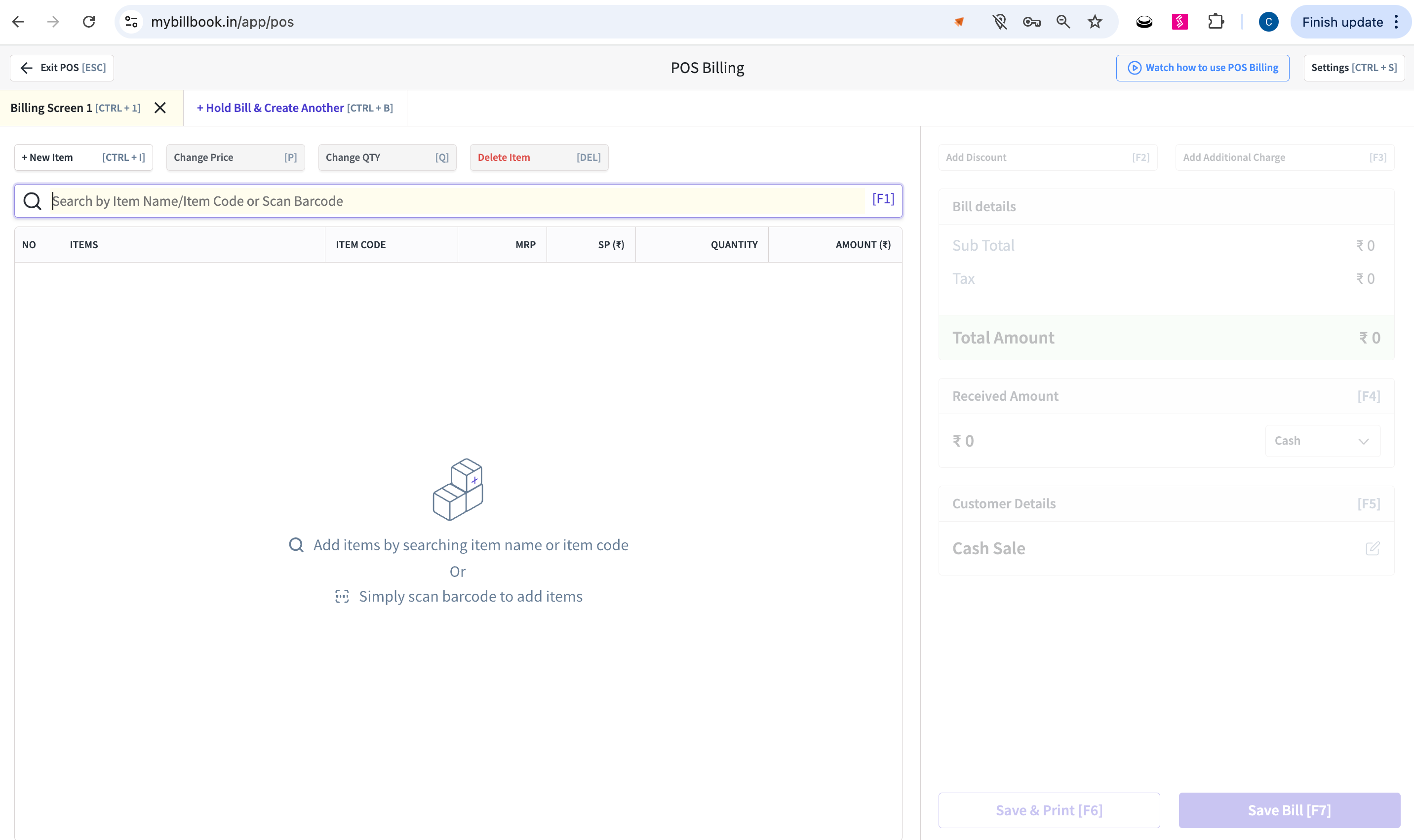
POS Billing Now Available on Web Version along with Desktop App

Platform: 🌐 Web

The POS (Point of Sale) billing experience, previously exclusive to the desktop app, is now available directly on the web. This update also brings barcode label printing support to streamline item management and checkout processes for retail businesses.

This feature is perfect for:

  • Retail businesses using myBillBook for billing and inventory.

  • Store owners with multiple billing counters.

  • Users looking for a flexible POS setup without depending on the desktop app.

What is the value?

  • No Desktop Dependency: Run POS billing from any web browser—no installation required.

  • Faster Checkout: Speed up sales with barcode scanning and quick billing features.

  • Barcode Label Printing: Print labels directly from the web for better item tracking and shelf management.

POS Billing screen on Web browser

How to use: Link to help article

NewImproved

Product Updates - Jan 23, 2025

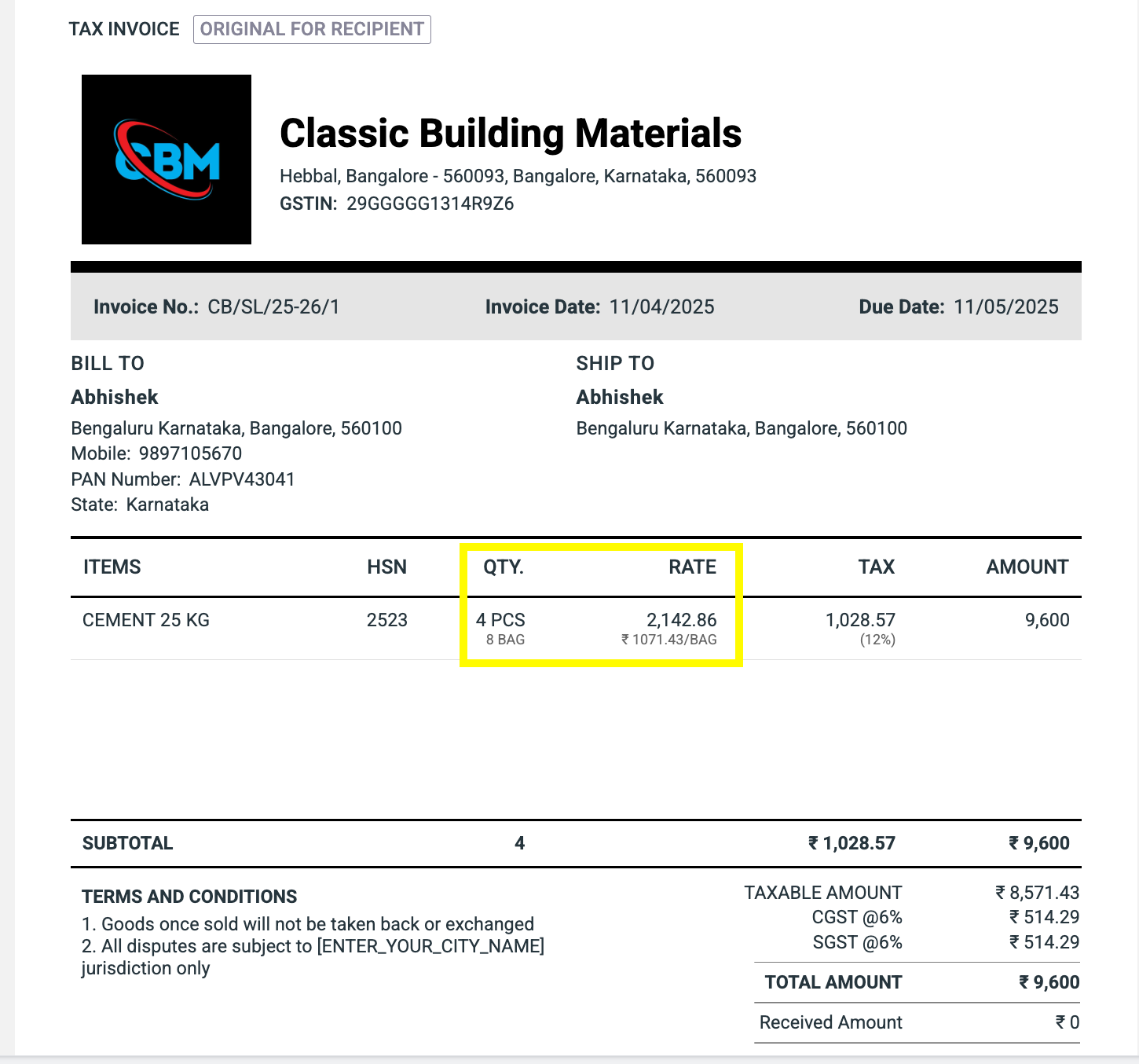
Show Alternate Units on Invoices for Better Clarity

Platform: 📱 Mobile | 🌐 Web

You can now display both primary and alternate measurement units for products directly on invoices. Whether you’re selling fabric in rolls and meters or oil in liters and milliliters, this update ensures clear, professional billing that suits your business and your customer’s needs.

This feature is perfect for:

  • Businesses in industries like textiles, construction, wholesale, manufacturing, or export where products are measured or billed using multiple units (e.g., kg & grams, meters & feet, pieces & cartons).

What is the value?

  • Clear & Transparent Invoices: Display both units side-by-side for better customer understanding

  • Flexible Product Handling: Configure alternate units at the product or customer level

  • Accurate Reports & Inventory: Maintain consistent tracking across units for compliance and analytics

See both primary and alternate units clearly displayed on invoice line items

How to use: Link to help article

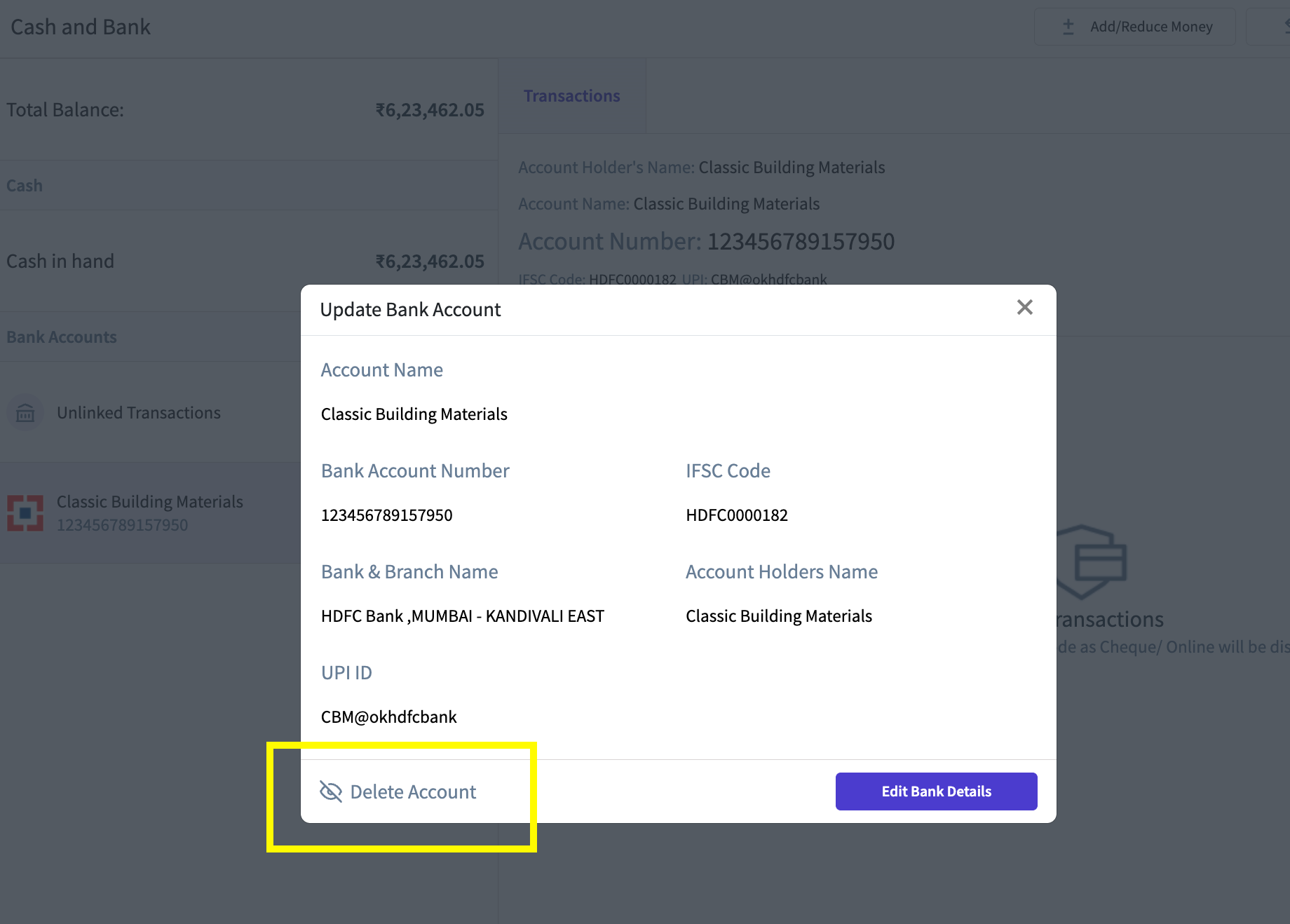
Easily Delete or Restore Bank Accounts Anytime

Platform: 📱 Mobile | 🌐 Web

You can now delete bank accounts that are no longer needed directly from the Account Details page. With added safety checks and restoration options, this feature makes managing your financial data more flexible and secure.

This feature is perfect for:

  • Business owners and admins maintaining clean financial records.

  • Users who added bank accounts by mistake or no longer use certain accounts.

  • Teams requiring role-based control over financial operations.

What is the value?

  • Cleaner Records: Remove outdated or unused bank accounts to keep your records streamlined.

  • Restore Anytime: Accidentally deleted an account? Easily restore it with one click.

  • Role-Based Access & Safety Checks: Only admins can delete, with audit logs and compliance checks in place.

Account Details with Delete Button

How to use: Link to help article

NewImproved

Product Updates - Nov 19, 2024

Add Receiver's Signature field on Invoice

Platform: 📱 Mobile | 🌐 Web

This feature allows you to include a receiver's signature field on your invoices and related documents. Once enabled, a designated space for the receiver's signature will be added to the PDF and print preview versions of the invoice.

This feature is perfect for:

  • Businesses that need signed proof of receipt or delivery.

  • Users managing sales, returns, or deliveries requiring customer acknowledgment.

What is the value?

  • Boost Professionalism: Add a formal signature section for greater credibility.

  • Proof of Agreement: Secure customer acknowledgment on essential documents.

  • Flexible Application: Works across key voucher types, including sales invoices, credit notes, quotations, sales returns, proforma invoices, and delivery challans.

Placeholder for “Receiver’s signature”

How to use: Link to help article

Add Custom Party Names to Shipping Addresses

Platform: 📱 Mobile | 🌐 Web

Users can now specify a different party name for shipping addresses while creating or editing a party or shipping details. This new field allows greater flexibility and clarity by associating custom party names with shipping addresses, which will be displayed alongside the shipping details.

This feature is ideal for:

  • Businesses managing deliveries for multiple parties at different locations.

  • Users needing distinct party names for shipping and billing purposes.

What is the value?

  • Enhanced Clarity: Clearly label shipping details with specific party names for better organization.

  • Seamless Editing: Easily update party names in existing shipping addresses without recreating them.

  • Improved Professionalism: Display both party name and shipping address on invoices, reducing ambiguity.

“Shipping Name” fields available during adding Shipping Address

How to use: Link to help article

Add Alternate Units to your inventory easily with Bulk Uploads

Platform: 🌐 Web

This feature allows users to specify alternate units and set conversion rates directly from the bulk upload screen while adding items. For users with batching enabled, these options will also be available when uploading batched items.

This feature is designed for:

  • Businesses managing inventory with alternate units (e.g., kilograms and grams).

  • Users who frequently upload large item lists in bulk.

  • Businesses that require precise tracking for batched items.

What is the value?

  • Streamlined Workflow: Add alternate units and conversion rates during bulk uploads, saving time and effort.

  • Increased Flexibility: Simplify inventory management for items measured in multiple units.

  • Enhanced Accuracy: Seamlessly configure unit details for both regular and batched items.

“Alternate unit” and “Conversion rate” fields in the bulk upload of items screen
How to use: Link to help article

NewImproved

Earlier updates