Product Updates

Follow new updates and improvements to myBillBook.

Product Updates - Apr 21, 2025

View Last 5 Item Prices for Repeat Customers

Platform: 📱 Android | 📱 iOS | 🌐 Web

This feature lets you see the last 5 prices at which a particular item was sold or purchased for a specific customer or supplier. When you add an item while billing a repeat customer, MyBillBook will show a price history—helping you apply consistent rates with just a click.

This feature is perfect for:

  • Retailers and wholesalers managing repeat customers

  • Businesses with dynamic pricing based on negotiation or trends

  • Users who want to avoid price errors in invoicing

What is the value?

  • ⏱ Saves time by eliminating manual price lookups

  • ✅ Ensures pricing consistency across transactions

  • 💰 Reduces revenue loss from underpricing or errors

  • 🔎 Quick reference to negotiated or previous rates

Recent sales prices displayed in the “Create Sales Invoice” screen

How to use: Link to help article

Track Payments & Modes Directly on Sales Invoice

Platform: 🌐 Web

You can now view a detailed payment history—along with payment modes—right within the sales invoice preview. This update provides full visibility into how and when a customer paid for a particular invoice.

This feature is perfect for:

  • Businesses tracking partial or staggered payments

  • Users needing better payment mode insights (UPI, Cash, Card, etc.)

  • Teams handling reconciliation and financial reporting

What is the value?

  • 📊 Gain financial clarity with visible payment modes on each invoice

  • 💳 Better reconciliation across UPI, cash, bank, or card transactions

  • 🔄 Live updates ensure real-time reflection of payments recorded

  • ⏱ Quick access to payment records without navigating multiple tabs

Payment history section along with “Record Payment In” option

How to use: Link to help article

Accept UPI Payments in Your Online Store

Platform: 📱 Android | 📱 iOS | 🌐 Web

You can now offer UPI-based payments on your myBillBook online store alongside Cash on Delivery (COD). This gives your customers the flexibility to choose their preferred payment method at checkout, boosting convenience and order success rates.

This feature is perfect for:

  • Business owners using myBillBook’s Online Store

  • Sellers who want to reduce cash handling

  • Users aiming to improve order conversion by offering flexible payments

What is the value?

  • 🚚 Lower cancellations by letting customers pay in advance

  • 🔐 Direct-to-you payments: All UPI payments go straight to your linked bank account—no intermediaries

  • 🔄 Flexible setup: Choose to enable either UPI, COD, or both

UPI payment option visible to the customers

How to use: Link to help article
New

Product Updates - Mar 20, 2025

Email Any Report Directly from Mobile

Platform: 📱 Android | 📱 iOS

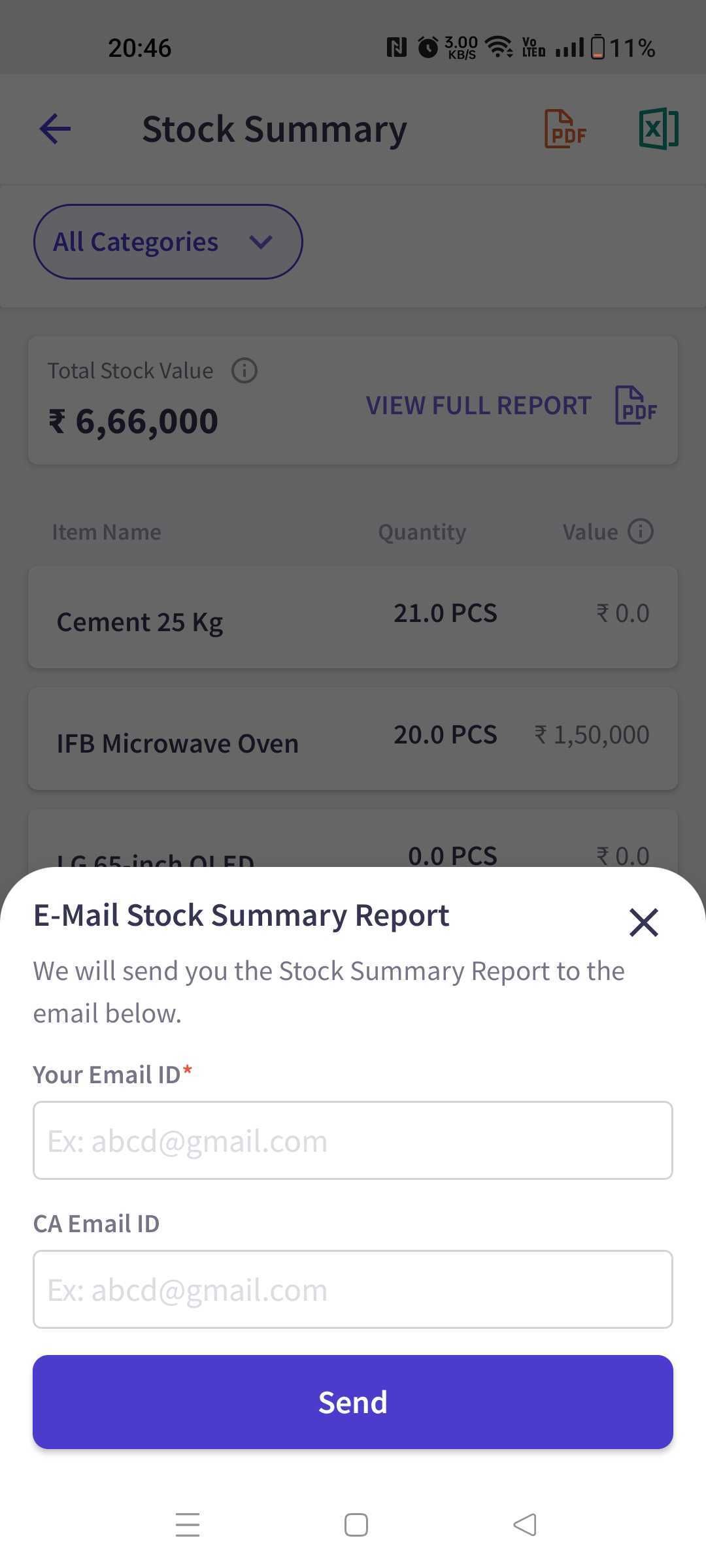
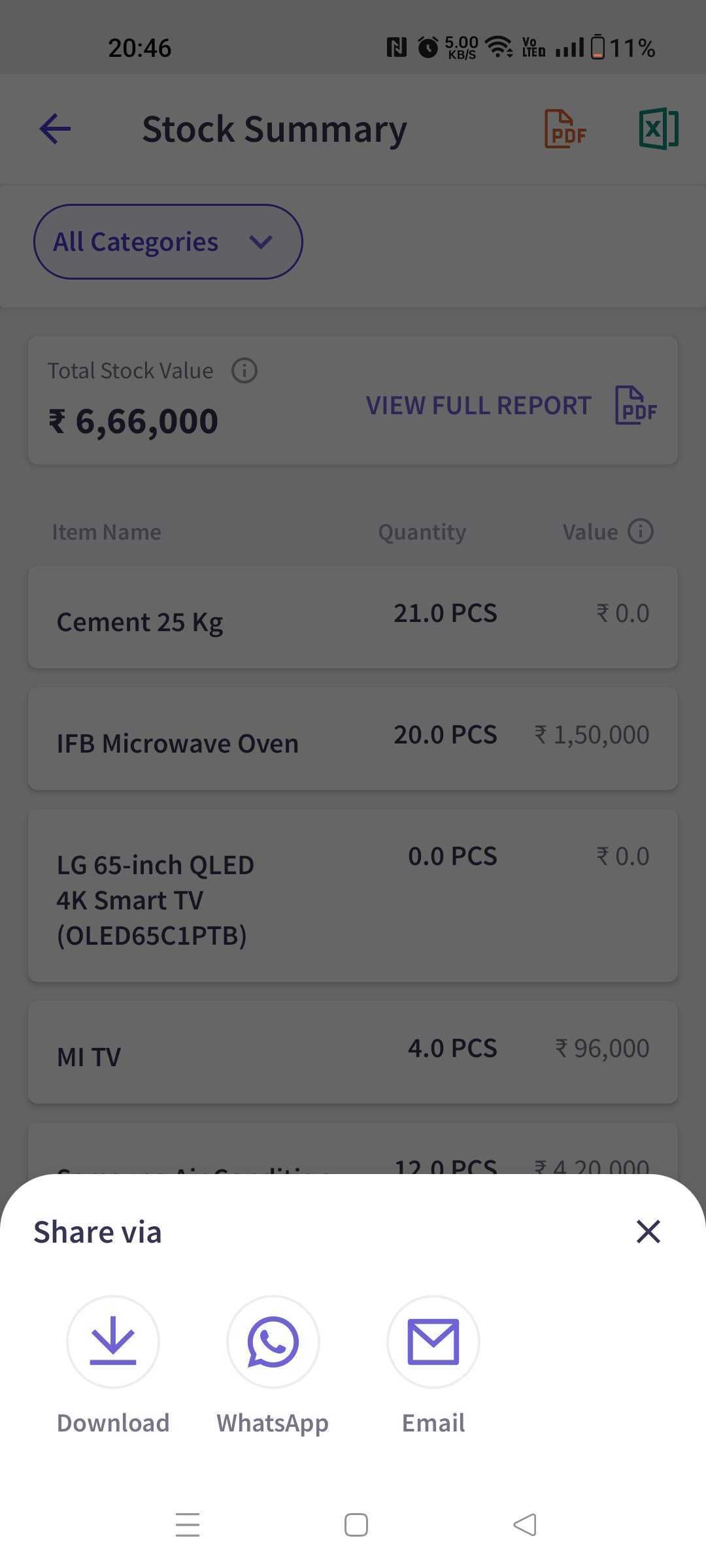
You can now email any report—PDF or Excel—right from your mobile device. A new unified bottom sheet lets you choose between Share, Download, or Email, making report sharing easier and more flexible than ever before.

This feature is perfect for:

  • Business owners who frequently share reports with accountants or partners.

  • Users managing GST, sales, inventory, and financial reports on mobile.

  • Anyone who needs a faster way to share reports without switching devices.

What is the value?

  • Email Instantly: Send reports to yourself or your CA without downloading them.

  • Simplified Workflow: One consistent sharing experience for all reports.

  • Auto-Fill for Speed: Email addresses are saved for future use, reducing repetitive typing.

Bottom Sheet with Share, Download, Email

Email Input Screen

How to use: Link to help article

View Dates in DD/MM/YYYY Format in All Reports

Platform: 📱 Android | 📱 iOS | 🌐 Web

All reports in myBillBook will now display dates in the DD/MM/YYYY format. This update applies across platforms and ensures a consistent, familiar view for all billing, accounting, and compliance reports.

This feature is perfect for:

  • Users accustomed to the DD/MM/YYYY date format.

  • Businesses that need consistent date representation for internal reviews, audits, or sharing reports with accountants.

What is the value?

  • Standardized View: Avoid confusion with one uniform format across all reports.

  • Better Readability: Easily interpret and compare dates during financial analysis.

  • Compliance-Friendly: Aligns with common Indian accounting practices.

How to use: You don’t need to take any action—this update is automatically applied to all your reports.

New

Product Updates - Feb 10, 2025

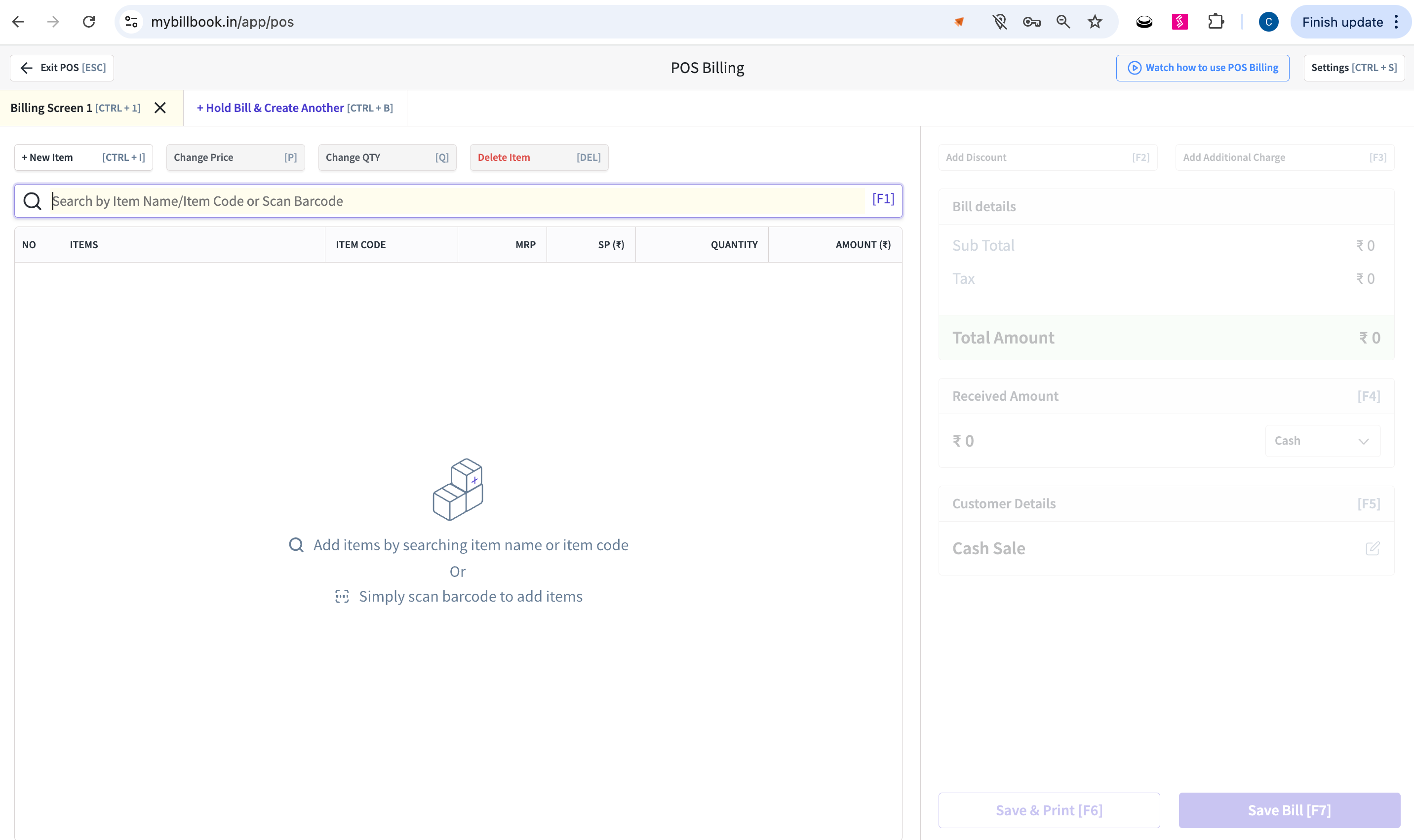
POS Billing Now Available on Web Version along with Desktop App

Platform: 🌐 Web

The POS (Point of Sale) billing experience, previously exclusive to the desktop app, is now available directly on the web. This update also brings barcode label printing support to streamline item management and checkout processes for retail businesses.

This feature is perfect for:

  • Retail businesses using myBillBook for billing and inventory.

  • Store owners with multiple billing counters.

  • Users looking for a flexible POS setup without depending on the desktop app.

What is the value?

  • No Desktop Dependency: Run POS billing from any web browser—no installation required.

  • Faster Checkout: Speed up sales with barcode scanning and quick billing features.

  • Barcode Label Printing: Print labels directly from the web for better item tracking and shelf management.

POS Billing screen on Web browser

How to use: Link to help article

NewImproved

Earlier updates