How to Add a Receiver's Signature Field to Your Invoices?
Written By Chetan Raikar
Last updated Almost 2 years ago
Overview
This guide explains how to enable and use the receiver's signature field for your invoices and related documents on both mobile and web platforms.
Prerequisites:
Latest version of myBillBook for mobile users.
Access to Invoice Settings on web or mobile.
Step-by-Step Instructions:
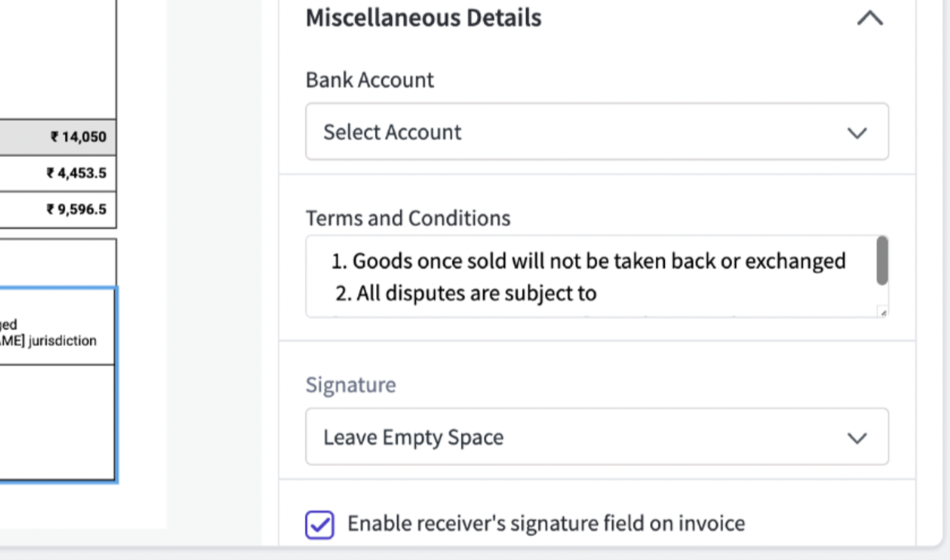
Enable the feature in Invoice Settings (mobile or web).
Generate an invoice or supported voucher type.
Preview the document to ensure the signature field is displayed correctly.
Share or print the document for customer acknowledgment.


FAQs
Which vouchers support the receiver's signature field?
Which vouchers support the receiver's signature field?
Sales invoices, credit notes, quotations, sales returns, proforma invoices, and delivery challans.
Can I customize the signature field's position?
Can I customize the signature field's position?
No, the field is placed automatically to maintain a professional format.
Was this helpful?
Still need help? Share an idea