How to Generate e-Invoice with myBillBook Billing Software
Know How to Generate e-Invoices on myBillBook Billing Software
Written By Team Flobiz
Last updated Almost 2 years ago
Feature Overview
e-Invoicing is an essential requirement for businesses under GST to streamline tax compliance and ensure invoices are uploaded on the GST portal seamlessly. With myBillBook GST Billing Software, you can generate einvoices directly from your sales invoices in just a few clicks. The e-invoice feature in myBillBook ensures quick, error-free compliance and saves valuable time for business owners.
Key Benefits
Simplified e-invoice generation process.
Reduces manual errors with auto-fetched details.
Seamless integration with GST systems via GSP credentials.
Real-time compliance for businesses of all sizes.
Advanced Usage Tips
Bulk e-Invoicing: While myBillBook currently supports single e-invoice generation, you can plan ahead by keeping all invoice details accurate for faster processing.
Compliance Tracking: Use myBillBook’s reports to monitor e-invoice compliance across your invoices.
How to Setup and Generate e-Invoice on myBillBook
Step 1: Enable the e-Invoicing Feature
Go to the Business Settings page in the myBillBook application.
Enable the e-Invoicing option.
Step 2: Generate e-Invoice from Sales Invoice
Go to the Sales Invoice Dashboard.
Select the invoice for which you want to generate the e-invoice.
Click on the “Generate e-Invoice” button located at the top-right corner of the screen.
Step 3: Enter GSP Credentials
Enter your GSP Username and Password (If you haven’t already added them).
If the credentials are pre-saved, a popup menu will appear. Select “Generate Only e-Invoice”.
Step 4: Verify Invoice Details
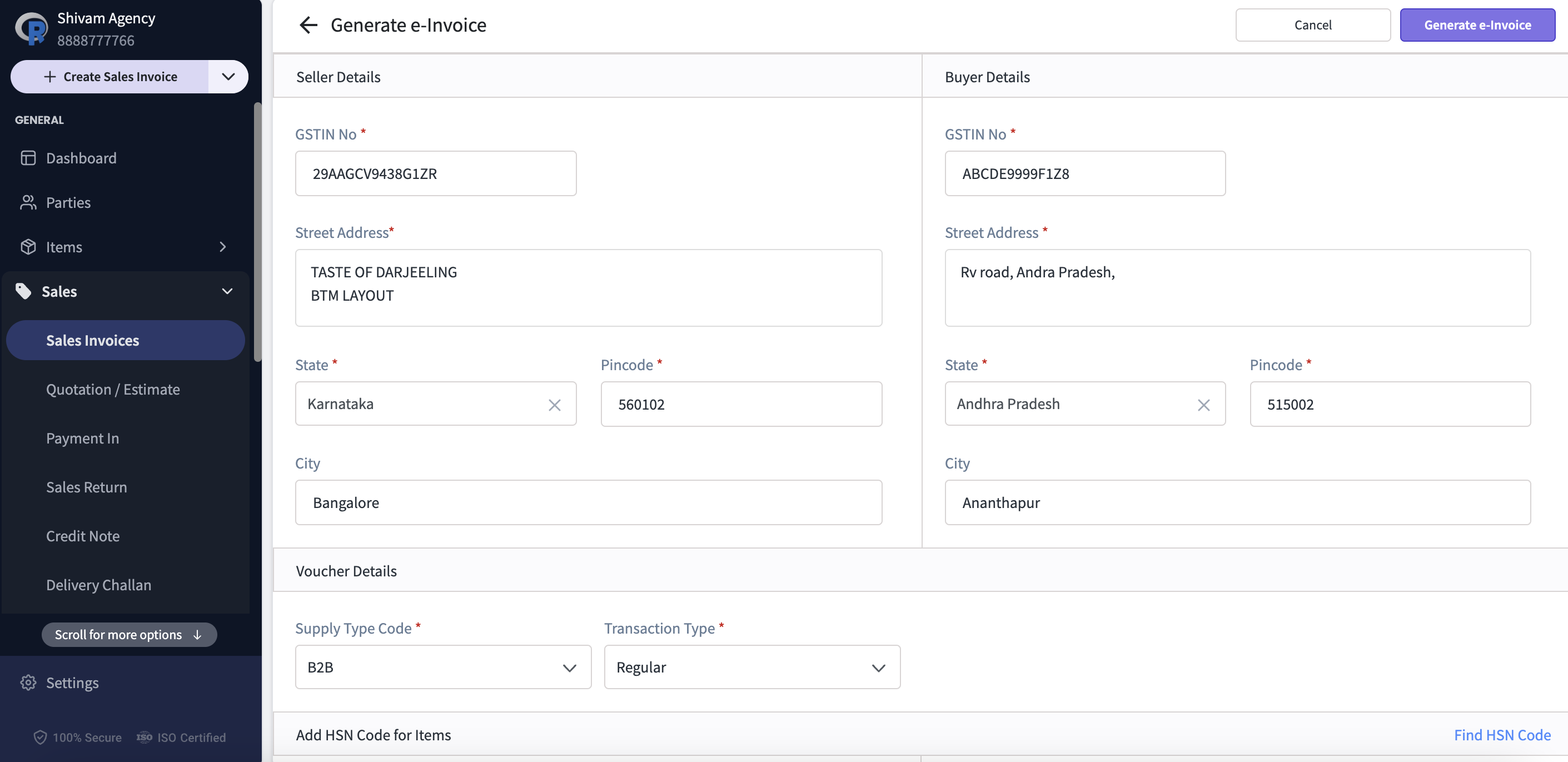
You will be redirected to the e-Invoice Generation Page.
All invoice details will be automatically fetched from the selected sales invoice.
Cross-verify all the details, such as GSTIN, HSN codes, and item amounts.
Step 5: Generate e-Invoice
Once all the details are verified, click on the “Generate e-Invoice” button at the top-right corner.
The e-Invoice will be successfully generated.
Watch How to Generate eInvoices on myBillBook
FAQs on e-Invoice Generation
What are GSP credentials, and why are they required?
What are GSP credentials, and why are they required?
GSP (GST Suvidha Provider) credentials are required to link your business with the GST portal for e-invoice generation. You need to enter these details in myBillBook to enable e-invoicing.
Can I generate multiple e-invoices at once?
Can I generate multiple e-invoices at once?
No, currently, e-invoices need to be generated individually for each sales invoice.
How do I ensure that my e-invoice details are accurate?
How do I ensure that my e-invoice details are accurate?
myBillBook auto-fetches all invoice details. Ensure the GSTIN, HSN codes, and item details are correctly added to the invoice before generating the e-invoice.
What should I do if my e-invoice is not reflecting on the GST portal?
What should I do if my e-invoice is not reflecting on the GST portal?
This may happen due to delays on the GST portal. You can manually check the status on the GST portal. If the issue persists, raise a ticket on the GST e-invoice portal.
Do I need to enter GSP credentials every time?
Do I need to enter GSP credentials every time?
No. Once you save your GSP credentials in myBillBook, you don’t need to enter them again.
Was this helpful?
Still need help? Share an idea