How to Create an Expense Entry in myBillBook
Know how to create an 'Expense Entry' in myBillBook
Written By Aashika Singh
Last updated Almost 2 years ago
Feature Overview
The Expense Voucher feature in myBillBook billing software simplifies business expense management. It allows users to log expenses systematically, track spending by category, and generate reports for better financial analysis. Whether you're dealing with GST-compliant expenses or general operational costs, this tool ensures all your expense entries are accurately recorded.
Use Cases
Vendor Payments: Record recurring vendor payments with or without GST.
Office Utilities: Track utility bills such as electricity, internet, and water.
Employee Reimbursements: Manage employee reimbursements efficiently.
Steps to Create an Expense Entry in myBillBook
Step 1 : Access the Expense Module
Navigate to the Expense section from the left-hand menu.
Step 2 : Initiate a New Entry
On the Expense Dashboard, click on Create Expense.
Step 3 : Choose GST or Non-GST Entry
Use the toggle on the left-hand side to select whether the expense includes GST.
Step 4 : Select or Add an Expense Category
Choose a category from the dropdown menu.
If the desired category is not listed, click Add/Manage Category to create a new one.
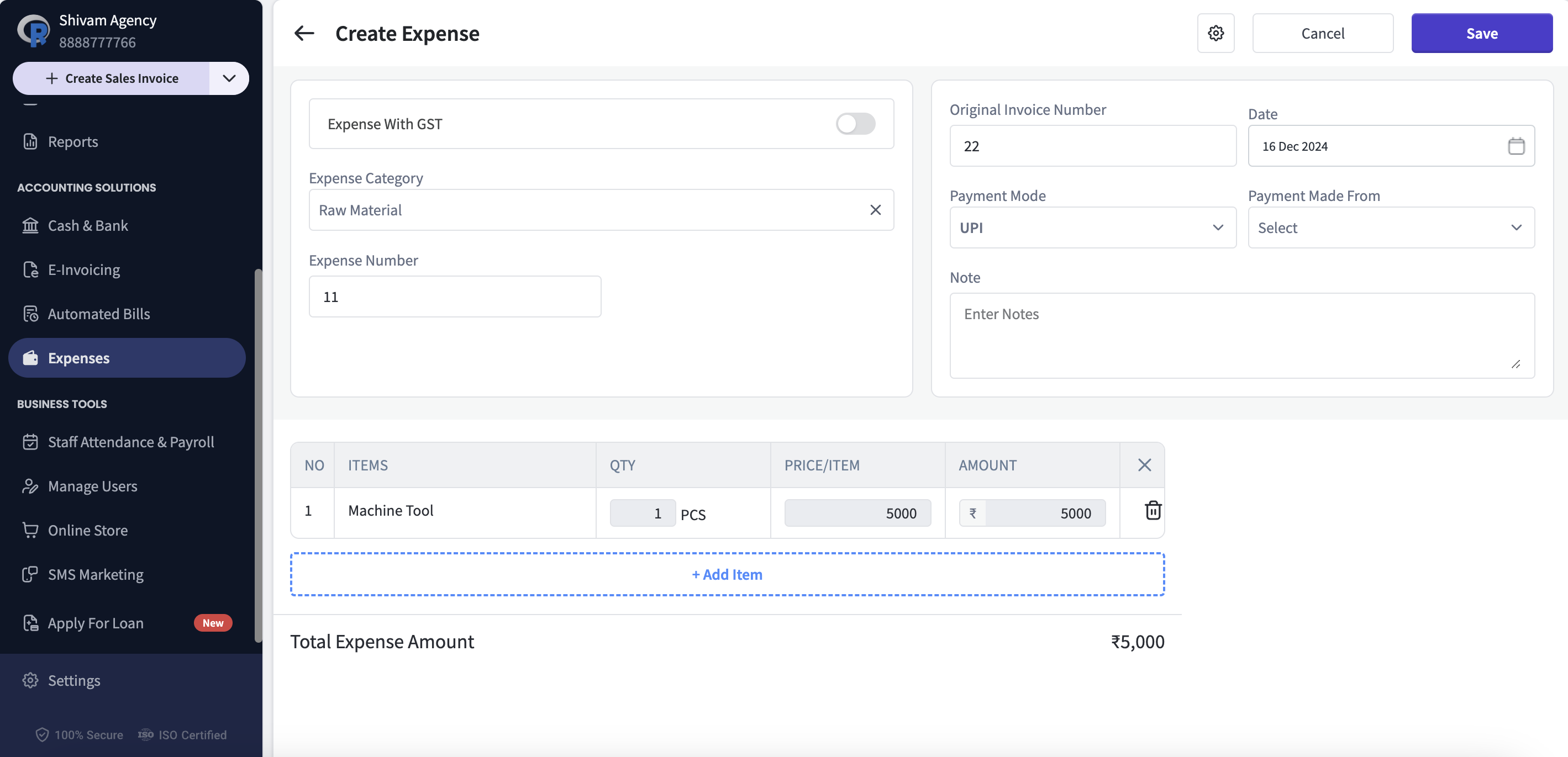
Step 5 : Add Expense Items
For pre-defined expense items, select from the available list.
To add a new item, click Create New Item. (Note: Expense items are separate from inventory items.)
Step 6 : Enter Invoice Details
Optionally, input the original invoice number for reference.
Step 7 : Save the Expense Entry
After completing all fields, click Save to record the expense.
Watch How to Create an Expense Entry in myBillBook
FAQs on Expense Entry
Can I edit an expense entry after saving it?
Can I edit an expense entry after saving it?
Yes, navigate to the specific entry, click Edit, make necessary changes, and save.
What happens if I need to add a GST expense later?
What happens if I need to add a GST expense later?
You can toggle the GST option at any time during entry creation.
Are expense categories customizable?
Are expense categories customizable?
Absolutely! You can add, edit, or delete categories under Add/Manage Category.
How are expense items different from inventory items?
How are expense items different from inventory items?
Expense items are for recording costs not related to stock or inventory, such as services or office supplies.
Can I view a summary of all expenses?
Can I view a summary of all expenses?
Yes, the Expense Dashboard provides a comprehensive view of all recorded expenses.
Was this helpful?
Still need help? Share an idea